


Having trouble logging in? Here’s what to check:
If you’re experiencing login issues, it’s likely due to one of the following reasons:
1. You need to be registered in the system
If you are a member of LMGA and have received emails from landings-mens-golf@golf-lmga.org, then you are in our system. Otherwise, go to “Join Our Club” in the menu, complete and submit an application. In that process, you will supply the email address to use to login to our system along with a password. After we process your application, you will receive a welcome email from our membership team. You should be able to login to our website as a member using the email address and password you created.
2. Assistance Logging into the site, navigating the site and updating your Profile
We have created a series of videos to assist you with to:
3. Resetting Your Password
If you’ve forgotten your password or need to set one up, follow these steps:
- On the login page, click the “Lost your password?” link. (see below)

- On the next page, enter the email address associated with your LMGA account then click Get New Password. (see below)
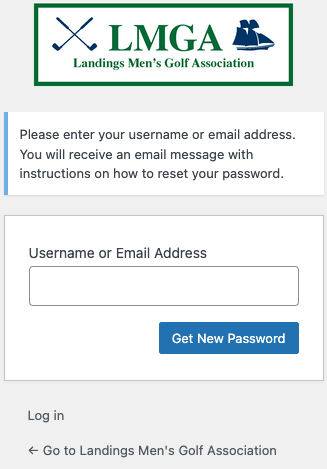
- Check your email. You will receive a message with a password reset link. Click the link, enter a new password, confirm it, and save the new password in your records.
- IMPORTANT: your mail service may flag the email from our system as SPAM which means you may not see the password reset email in your inbox. Check where your SPAM email goes to locate the message. Avoid repeated attempts to change your password. Instead, send an email to help@golf-lmga.org for assistance.
4. Logging in After a Password Reset
- Go to https://golf-lmga.org and click on “Login” in top right corner.
- Enter the email address (that is your username) you associated with your account.
- Enter your new password and click Login.
5. Update Your Personal Profile Information and Change Password
Upon logging in to your LMGA account, locate the “My Account” menu on the menu near the top of the page.
That should display your Account page. To the left are two submenus. Locate “Edit Your Profile” and click on that link. On this page you can update your personal information. You can also set a new password at the bottom of the page. Don’t forget to click the SAVE button at the bottom of the page to save your updates.
6. Need Help?
If you’re still having trouble accessing your account, email help@golf-lmga.org, and we’ll assist you as soon as possible.